Active@ Disk Image

Hard Drive Backup Software

Downloads | Products | Support | Partners | Contacts  
Active@ Disk Image


Active@ Disk Image Support Center
Users Guide


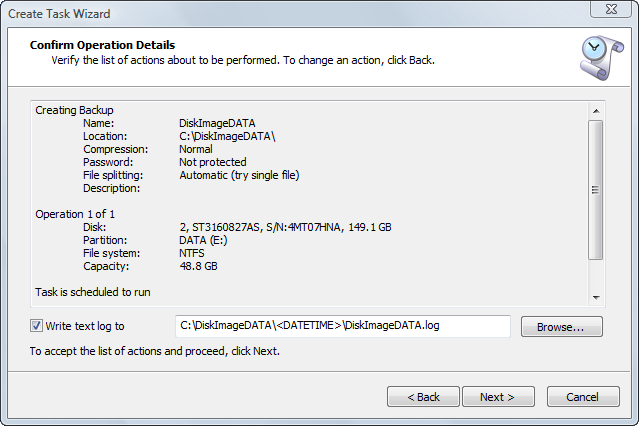
Confirming Task Details

Review the details of this page carefully. To change an item on this page, click Back and change an option, if needed before saving the task.

By default a text log file will be created in the backup folder with the name of backup and .log extension. Since automated (or scheduled) backups are stored in the folder containing the date and time stamp, the default log name will appear as follows:

If the backup location is C:\Backups and the backup name is Disk Image, the log name will be shown as C:\Backups\DiskImage\DATETIME\DiskImage.log where <DATETIME> will be substituted with the actual date and time.

See Also

Tasks Dialog

Rescheduling a Task


Previous Contents Next
Active@ Disk Image
Active@ Products

Active@ Boot Disk
is a bootable Live CD/DVD for system recovery purposes.
Active@ File Recovery
recovers data after formatting or loss of partitions.
Active@ KillDisk
is a disk eraser software for secure formatting of hard drives. DoD 5220.22-M compatible.
Active@ Password Changer
is a DOS-based solution for resetting local user passwords.
Active@ Partition Recovery helps to recover deleted partitions and logical disks on hard drives.


Send Feedback | Report an Error

Active@ Data Recovery Software 2008

DownloadBuyLearn more